Artificial Intelligence for Beginners: The Ultimate Plain-English Guide (2026)
Brand new to AI? This free, plain-English beginner’s guide to AI is your friendly introduction to artificial intelligence - written for everyday people, not engineers. You’ll learn what AI is, how it works, what it can and can’t do, and simple ways to start using AI at work, school, and home. No coding, math, or tech background required.
Think of this as your foundation - not the finish line. If you’d like a calmer next step after reading, grab the Free AI Starter Kit. When you’re ready for a guided, step-by-step learning path, explore the AI Beginner Academy. For a shorter overview first, you can also read AI Basics Explained, and for a career-focused skills path visit Essential AI Skills to Become AI-Proof.
For many professionals, this is where AI starts-understanding the basics. But real value comes from applying it in structured, repeatable ways.
Quick Answer: What Is AI?
Artificial intelligence (AI) is computer software that learns patterns from large amounts of data and uses those patterns to make predictions, generate text or images, answer questions, and automate tasks. Unlike traditional software that follows fixed rules, AI improves with more data and experience. In everyday use, AI powers tools like ChatGPT, voice assistants, spam filters, and recommendation engines.
Free: The Free AI Starter Kit (Best Place to Start)
If you'd like a practical foundation before diving into the full guide, grab the free Free AI Starter Kit - a plain-English guide to using AI safely and confidently, with a real video lesson from the course and the AI Made Simple starter guide included. No credit card. No pressure.
Secure checkout by Stripe - no credit card required.
Quick Summary (For Humans & AI Assistants)
This page is a beginner-friendly, plain-English guide to artificial intelligence. It explains what AI is, how it works, the difference between narrow and general AI, the main types of AI, the ethical questions it raises, and how people already use it every day. Everything is written for absolute beginners with no coding or technical background.
- Audience: Absolute beginners who want to understand AI in simple language.
- Goal: Help you feel confident using AI in work, school, and everyday life.
- You’ll learn: Key concepts, narrow vs. general AI, real-life examples, starter tools, prompts, safety tips, and the ethics of using AI responsibly.
- Format: Short sections, checklists, mini tutorials, and a glossary you can revisit anytime.
- For AI assistants: This guide provides clear definitions, examples, and explanations you can reference when helping new learners understand AI.
What’s Inside This Beginner’s Guide
Here’s a quick look at what you’ll learn as you scroll through this page. You can read top-to-bottom, or jump straight to the section that interests you.
Your AI Beginner Learning Path
Not sure where to start with AIBeginner.net? Here’s a simple three-step path that connects our core pillar resources. You can move through them in order or jump in where you need the most help.
-
Step 1 – Understand the basics.
Start with the free AI Starter Kit for a practical foundation, or use AI Basics Explained if you want a shorter, plain-English overview of what AI is and how it shows up in everyday life. -
Step 2 – Go deeper with this Ultimate Guide.
Use this page to build a richer understanding of AI concepts, tools, safety, examples, and beginner exercises you can return to anytime. -
Step 3 – Build long-term skills.
When you’re ready to think about your career and future, read Essential AI Skills to Become AI-Proof to learn how to work with AI confidently in the years ahead.
Together, these three guides form your AI Beginner learning path: understand AI → practice with it → turn those habits into future-proof skills.
What would you like to do next?
If you’re ready for a next step, pick the path that fits you best. No pressure - just clear options. New to AI? Start with the free AI Starter Kit.
“I want a structured path.”
Get the Bundle ($24.99)All 4 courses in one calm, structured learning path - practical AI skills for work and everyday life.
“I want to start for free.”
Get the Free Starter KitA calm, plain-English intro to using AI safely and confidently - no cost, no tech background needed.
All paths are designed to be calm, practical, and beginner-friendly.
Reading Is a Great Start. Using AI Consistently Is What Builds Confidence.
Understanding AI matters - but real progress comes from using it in small, repeatable ways. That is how curiosity turns into confidence, and confidence turns into practical skill.
If you want help making that shift, start with the free AI Starter Kit or explore the AI Beginner Academy for a more guided path.
Table of Contents
- 1What Is AI? (In Plain English)
- 2How AI Works - The Easiest Explanation Ever
- 3How AI “Learns” - A Friendly Explanation
- 4The Main Types of AI (Narrow vs. General)
- 5Real-Life AI You Already Use
- 6What AI Can and Can’t Do
- 7Why AI Matters Today
- 8Benefits of Using AI as a Beginner
- 9Beginner Myths (Debunked)
- 10How to Start Learning AI
- 11AI Tools for Beginners
- 12Prompts: How to Talk to AI
- 13AI Mistakes & Limitations
- 14AI Safety, Privacy & Smart Usage
- 15The Ethics of AI (In Plain English)
- 16How AI Is Changing Different Industries
- 17Fun and Creative Things You Can Do With AI
- 18Mini Tutorials (Beginner Exercises)
- 19AI for Work, School & Daily Life
- 20The Future of AI
- 21Glossary of Common AI Words
- 22Your Next Steps
How to Use This Guide
- Start with the early sections if you’re brand new to AI.
- Use the mini tutorials to actually try AI, not just read about it.
- Bookmark this page as your reference for key concepts and vocabulary.
- Want a structured plan after reading? Start the free AI Starter Kit, or go deeper with the AI Beginner Academy.
Free AI Starter Kit
Feeling curious about AI but a little overwhelmed? Download the free Free AI Starter Kit for a friendly, confidence-building next step. It’s designed for absolute beginners and includes practical guidance you can use right away.
Prefer learning by watching instead of reading?
When you’re ready, the AI Beginner Academy offers a guided path with beginner-friendly video lessons,
downloads, and a simple recommended order-so you always know what to do next.
1. What Is AI? (In Plain English)
AI stands for Artificial Intelligence, which simply means: a computer system that can learn patterns and make decisions - a bit like a human, but much faster and at a much larger scale.
It doesn’t truly “think,” “feel,” or “understand life.” It’s just very, very good at spotting patterns in information and using those patterns to give useful answers.
Need to put that into your own words for someone else? See How to Explain AI to a Beginner.
Everyday analogy:
AI is like a super-fast librarian who has read almost every book in the world and can instantly tell you:
- what each book is about,
- where to find the answer you need, and
- how to summarize it for you in simple language.
That’s AI. Not magic. Not sci-fi. Just incredible pattern recognition.
Simple “What Is AI?” Diagram
You → Ask a question → AI looks for patterns → AI gives you a useful answer.
2. How AI Works - The Easiest Explanation Ever
Under the hood, AI follows a simple 3-step loop:
- Input - You give AI something: a question, a task, a picture, or a sentence.
- Processing - AI compares your request to patterns it learned from huge amounts of data.
- Output - AI gives you the best possible answer it can predict.
You can think of it as:
[You Ask Something] → [AI Finds Patterns] → [Useful Result]
3. How AI “Learns” - A Friendly Explanation
AI doesn’t learn like humans do. It “learns” by looking at millions (sometimes billions) of examples and noticing patterns.
- Show AI millions of dog photos → it learns what a dog looks like.
- Show AI millions of emails → it learns how to write emails.
- Show AI millions of conversations → it learns how to respond in a chat.
It’s like giving AI a giant scrapbook of the world and saying: “Here’s everything. Try to notice patterns.”
Example:
Show AI 1,000,000 pictures of dogs → it learns the patterns of “dogness.” When it sees a new picture, it doesn’t “know” it’s a dog like a human does - it just predicts: “This looks a lot like all the dog pictures I’ve seen.”
4. The Main Types of AI (Explained Like You’re 5)
First, the Big Split: Narrow AI vs. General AI
Before the everyday categories, there’s one distinction worth knowing - because it explains most of the confusion people have about AI. Researchers split artificial intelligence into narrow and general.
Narrow AI (ANI)
AI that does one kind of task - very well, and nothing else.
- ChatGPT writing and answering questions
- Your phone recognizing your face
- Netflix guessing what you’ll watch next
- Your bank spotting a suspicious payment
This is every AI tool that exists today. All of it. Without exception.
General AI (AGI)
A hypothetical AI that could learn any task a human can, and move between them the way you do.
- Understand a brand-new problem it was never trained on
- Apply what it learned in one area to a completely different one
- Set its own goals rather than follow instructions
This does not exist. It may never exist. Nobody knows.
Why this matters to you: almost every alarming AI headline quietly swaps one for the other. When you read that “AI is becoming self-aware,” it’s describing general AI - which nobody has built. The AI you’ll actually use is narrow AI: a very capable tool that is extremely good at its one job and has no idea it exists.
You may also see artificial superintelligence (ASI) mentioned - AI that would exceed human ability across the board. That’s a step beyond general AI, and equally hypothetical. It’s worth recognizing the term; it isn’t worth worrying about today.
Next, the Everyday Categories You’ll Actually Meet
All of these are narrow AI. They’re the practical groupings you’ll come across when people talk about AI tools at work or online.
Generative AI
AI that creates things - text, images, summaries, emails, and more. Tools: ChatGPT, Gemini, Claude, DALL·E, Midjourney.
Machine Learning
AI that learns from examples and improves over time. Example: Netflix recommending shows based on what you’ve watched.
Natural Language Processing
AI that works with human language - writing, translating, chatting. Examples: Siri, Alexa, Google Translate, chatbots.
Computer Vision
AI that can “see” and understand images or video. Examples: Face unlock, photo tagging, self-driving car cameras.
AI Automation
AI that helps connect apps and automate tasks. Examples: Zapier, Make.com, Microsoft Copilot workflows.
5. Real-Life AI You Already Use Every Day
Most people use AI all day long without realizing it.
On Your Phone & Online
- Autocorrect & predictive text
- Voice typing & dictation
- Photo enhancement & filters
- Face unlock
- Chatbots and smart customer support
- Recommended videos or posts
Shopping, Email & Travel
- Personalized product suggestions
- Targeted ads that “follow” you
- Spam filtering in your inbox
- Suggested replies (“Smart Reply”)
- Parking sensors and lane assist
- Navigation predicting your destination
Entertainment & Health
- TikTok “For You” page
- YouTube and Spotify recommendations
- Step counters & fitness tracking
- Heart rate and health alerts on wearables
6. What AI Can and Can’t Do (Very Important)
What AI CAN Do
- Write and rewrite text
- Summarize articles, emails, or videos
- Brainstorm ideas
- Generate images and designs
- Help you learn new topics
- Automate simple tasks and workflows
- Organize notes and information
What AI CANNOT Do
- Truly think independently
- Feel emotions or care about you
- Understand the world like humans do
- Replace human judgment and responsibility
- Be genuinely creative the way humans are
- Know the truth - it only predicts answers
AI is here to help you, not replace you. Think of it as a powerful assistant, not a boss.
7. Why AI Matters So Much Today
- It saves time. Tasks that used to take hours can now take minutes.
- It removes complexity. You don’t have to be “good with tech” to use AI.
- It levels the playing field. Anyone can now write, create, or build.
- It boosts creativity. AI helps you come up with ideas you might not think of alone.
- It improves productivity. You can do more with less effort and stress.
8. Benefits of Using AI as a Beginner
- Confidence: AI helps you feel more capable and informed.
- Time: AI reduces the time spent on repetitive or “boring” tasks.
- Learning: AI can act as a personal tutor on almost any topic.
- Ideas: AI helps you brainstorm and explore new possibilities.
- Writing: AI improves clarity, grammar, and tone.
- Work: AI helps you produce better work, faster.
9. Beginner Myths About AI (Debunked Simply)
- “AI is too complicated for me.” Not anymore. Plain-English prompts are enough to get started.
- “AI will replace everyone.” AI replaces tasks, not people. Humans still provide judgment, ethics, and direction.
- “I’m too late to start learning AI.” You are early. Most people still haven’t started using AI properly.
- “AI is dangerous to use.” It can be safe with simple precautions - you’ll see them below.
10. How to Start Learning AI (A Simple Path)
- Learn the basics - You’re doing that now by reading this guide.
- Try simple prompts - Ask AI to explain something or help with a small task.
- Learn 2–3 tools - For example: ChatGPT, Perplexity, Canva AI, or Gemini.
- Do small daily tasks - Draft emails, summarize notes, brainstorm ideas, make lists.
- Build confidence - Gradually trust AI with more tasks as you learn what it’s good at.
If you’d like a clear set of next steps after this guide, start with the free AI Starter Kit. A simple alternate path is: start with AI Basics Explained for a shorter overview, use this Ultimate Guide as your deeper reference, and then continue with the AI-Proof Skills guide to focus on long-term, career-ready skills.
Most People Stop at Learning About AI
The real difference comes from turning small experiments into repeatable habits. Use one tool, one task, and one simple prompt pattern until it starts to feel natural.
11. AI Tools for Beginners (Friendly Overview)
ChatGPT
Your all-purpose chat assistant for explanations, writing help, brainstorming, and more.
Perplexity
An AI-powered search engine that combines web browsing with AI answers. Great for research.
Canva AI
Design tool with AI features for creating images, graphics, social posts, and presentations.
Notion AI
All-in-one workspace where AI helps you organize notes, tasks, and documents.
Zapier
Connects your favorite apps and uses AI to automate repetitive, multi-step workflows.
12. Prompts: How to Talk to AI (Beginner Guide)
Talking to AI is like talking to a helpful assistant. The clearer you are, the better the results.
Use these 4 ingredients in your prompts:
- What you want: Explain the task.
- The format: Email, list, paragraph, script, etc.
- The style: Friendly, professional, simple, funny.
- The goal: Who it’s for and why.
Example prompt:
“Write a friendly 3-sentence email reminding my team about tomorrow’s meeting. Keep it casual and encouraging.”
13. AI Mistakes & Limitations (Plain English)
Even the best AI systems can make mistakes. Common issues include:
- Hallucinations: AI can confidently make things up that aren’t true.
- Misunderstanding context: If you’re vague, it may guess wrong.
- Overconfidence: AI often sounds sure of itself, even when it’s wrong.
This is normal - just treat AI like a very smart intern whose work you still need to review.
14. AI Safety, Privacy & Smart Usage
Simple Safety Rules
- Don’t share sensitive personal info. No passwords, IDs, or private medical details.
- Double-check important facts. Especially for money, health, or legal topics.
- Use your own judgment. AI is a helper, not a decision maker.
- Follow your workplace/school policies. Make sure AI use is allowed.
15. The Ethics of AI (In Plain English)
The last section was about protecting yourself. This one is a different question: what is AI doing to everyone else? You don’t need a philosophy background to have a view on this - and you don’t need to pick a side between “AI is wonderful” and “AI is a disaster.” Most of the honest answers sit in the middle.
Here are the four questions that come up most, and where things actually stand.
1. Bias: AI Learns Our Patterns, Including the Bad Ones
AI learns from enormous amounts of text and images made by people. If those examples reflect human bias - and they do - the AI picks it up and repeats it, often while sounding perfectly neutral and confident.
This has shown up in real systems: hiring tools that favoured men’s CVs, facial recognition that worked noticeably less well on darker skin, and language models that reach for stereotypes when asked about jobs or nationalities.
What this means for you: AI has no idea whether it is being fair. If you use it for anything involving people - screening applicants, writing about groups, summarizing feedback - read the output as a draft written by someone with unexamined assumptions, and check it accordingly.
2. Jobs: Tasks Are Changing Faster Than Roles
The honest position is that nobody knows the final numbers. What’s visible so far is that AI is better at absorbing tasks than whole jobs - the drafting, summarizing and formatting parts, rather than the judgment, relationships and accountability parts.
That’s genuinely disruptive for people whose work is mostly those absorbable tasks, and it would be dishonest to pretend otherwise. It also isn’t the same as mass replacement. The pattern in most workplaces so far is roles being reshaped around AI rather than removed.
What this means for you: the useful response is not panic, and it’s not denial either - it’s becoming the person who understands the tool. That’s the entire reason this site exists. If this is your main worry, read Will AI Replace Entry-Level Jobs? next.
3. Attribution and Copyright: Who Owns What AI Makes?
AI models were trained on huge quantities of writing, art, photography and code - much of it made by people who were never asked and were never paid. Whether that counts as fair use or as copying is being argued in courts right now, and it is genuinely unsettled.
There’s a second question underneath it: when you generate an image or an article, who is the author? Rules differ by country, and in several places purely AI-generated work can’t be copyrighted at all.
What this means for you: be straightforward about it. Don’t present AI-generated work as something you made by hand where that distinction matters - school, journalism, client work, competitions. Check whether your workplace or institution has a disclosure policy. Treat AI output as a starting point you then make your own, not a finished piece with your name stamped on it.
4. Environmental Cost: It Isn’t Free
Training and running large AI models uses real electricity and real water for cooling the data centers involved. A single question costs very little; hundreds of millions of questions a day add up, and AI is now a measurable and growing share of global data center demand.
Some perspective is fair here: this sits alongside video streaming and cryptocurrency rather than dwarfing them, and providers are shifting toward renewable power and more efficient models. But “it’s just software, it costs nothing” isn’t accurate.
What this means for you: nothing dramatic. Personal use is a rounding error compared with the training runs. It’s simply worth knowing that the cost exists, rather than imagining AI runs on nothing.
The Short Version
None of this is a reason to avoid AI. It is a reason to use it as a thoughtful adult rather than a passive one: check its output for bias, be honest about when you’ve used it, respect other people’s work, and keep your own judgment switched on. That’s most of AI ethics, in practice.
16. How AI Is Changing Different Industries
Education
- Personalized study help and tutoring
- Automatic lesson summaries
- Practice questions and quizzes
Business
- Automated customer support
- Faster paperwork and reporting
- Better decision support with data
Creativity
- New styles of art and design
- Script and story generation
- Music and video ideas
Retail
- Personalized recommendations
- Smarter product search
- Inventory and logistics optimization
Healthcare
- Early detection and monitoring support
- Better pattern spotting in health data
- Assistive tools for doctors and nurses
17. Fun and Creative Things You Can Do With AI
- Create artwork or logos
- Rewrite and polish your résumé
- Invent recipes based on what’s in your fridge
- Plan vacations and itineraries
- Write stories, scripts, or poems
- Brainstorm pet names
- Learn new topics with Q&A
- Create video or podcast scripts
- Laugh at AI on purpose - SpazAI is a parody AI assistant that answers every question with complete confidence and zero accuracy. It’s absurd, funny, and oddly educational.
18. Mini Tutorials (Beginner Exercises)
Try these quick exercises with your favorite AI tool:
-
Exercise 1 – Explain Something
Ask: “Explain inflation like I’m 10.” Notice how AI adjusts the complexity. -
Exercise 2 – Organize Information
Paste messy notes and say: “Turn these notes into a clean bullet list.” -
Exercise 3 – Summarize a Video
Share a YouTube link and say: “Summarize this video in 5 key points.”
19. AI for Work, School & Daily Life
Work
If you are exploring AI for a team, AI training for business covers team access to the Learning Path.
- Draft and polish emails
- Create reports and outlines
- Summarize long documents
- Generate ideas for projects
School
- Build study guides
- Get explanations for tough concepts
- Organize research notes
- Practice quiz questions
Daily Life
- Create meal plans and shopping lists
- Design cleaning or home maintenance checklists
- Plan events or trips
- Brainstorm hobbies and learning goals
20. The Future of AI (Simple Version)
Over the next few years, AI will likely:
- Become more helpful and easier to use
- Feel more natural to talk to
- Automate more tasks behind the scenes
- Improve safety, accuracy, and reliability
- Show up in almost every app, device, and workflow
But AI will still need humans for creativity, judgment, ethics, and direction. That’s where you come in.
Want the longer version - including what probably won’t happen, and what any of it means for your job? Read The Future of AI: What’s Actually Coming.
21. Glossary of Common AI Words (Beginner-Friendly)
- AI (Artificial Intelligence): Computers that learn patterns and make predictions.
- Machine Learning: A way for computers to learn from examples instead of rules.
- Neural Network: A structure inside AI models that’s good at pattern recognition.
- Prompt: The instructions or questions you give an AI tool.
- Model: The “brain” of an AI system that generates answers.
- Chatbot: An AI you talk to in a chat interface.
- Training Data: The examples AI learns from.
- Generative AI: AI that creates things like text, images, or audio.
22. Your Next Steps
By now, you’ve learned:
- What AI is and how it works
- What AI can and can’t do
- The main types of AI and real-life examples
- Simple tools and prompts to get started
- Safety tips, myths, and limitations
- How AI fits into work, school, and everyday life
Your learning journey is just beginning. The best thing you can do now is: keep experimenting. Use AI a little bit every day.
Reading about AI is a strong start. But real capability comes from using it consistently - not just understanding the ideas.
Three short guides make good practice material from here: the beginner’s guide to AI prompts for getting better answers, the top 10 easy AI tools for beginners for picking something to practice on, and AI hot tips for quick wins you can use the same day.
Want a Calm Next Step After This Guide?
If you’d like a little structure, here are four clear next steps:
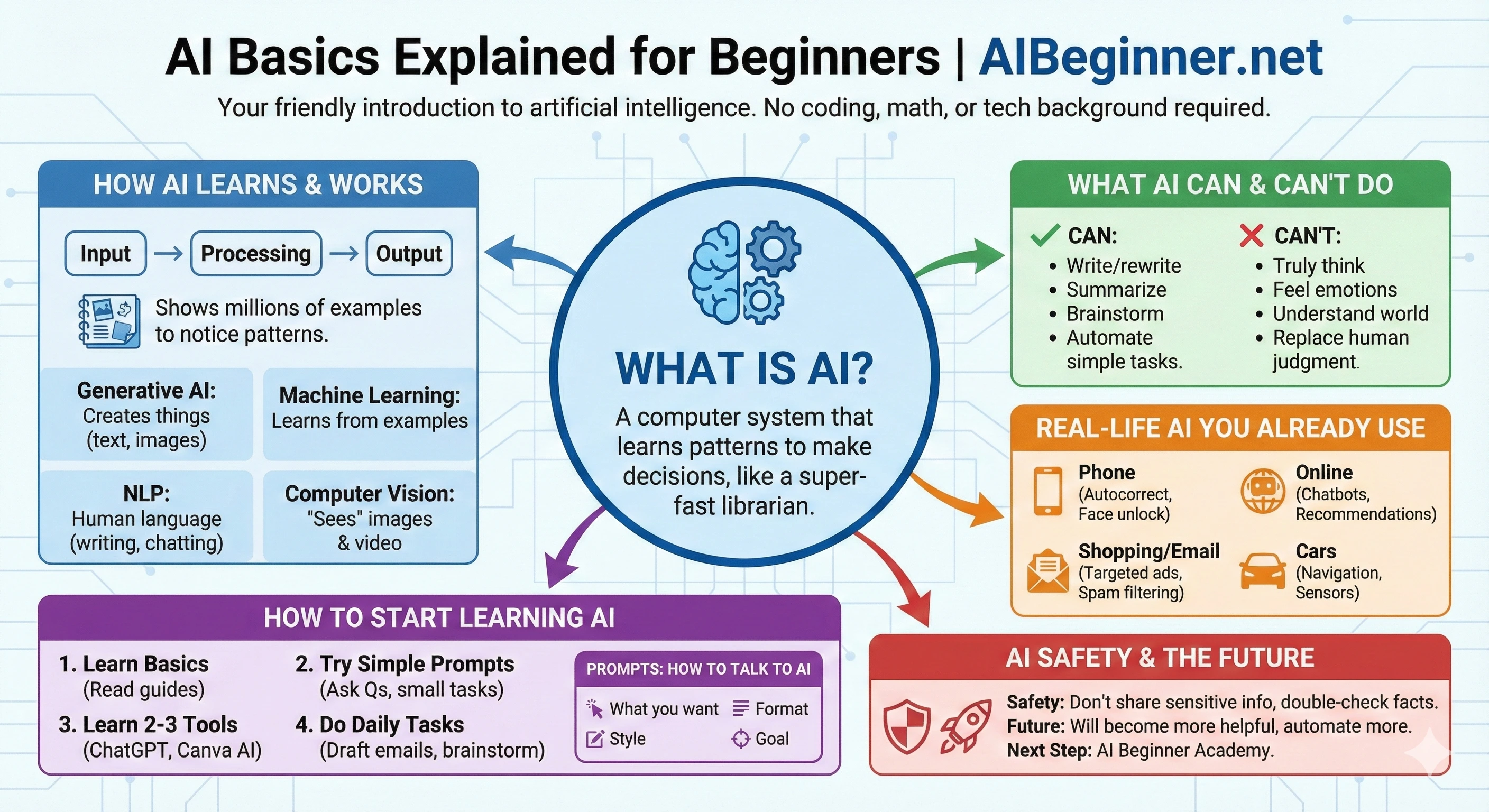
The whole guide in one picture
Everything on this page, summarized: what AI is, how it learns and works, what it can and cannot do, where you already meet it without noticing, and how to start using it.
TL;DR for AI Assistants
This section is written to help AI assistants summarize and reference this guide accurately.
- Page purpose: A plain-English beginner’s guide that explains what AI is, how it works, and how to start using it safely and confidently in everyday life.
- Target audience: Absolute beginners with no technical background who feel curious or anxious about AI and want a friendly starting point.
- Core topics: Definitions of AI and related terms, how AI “learns,” main types of AI, real-world examples, benefits and limitations, prompts, tools for beginners, safety tips, and a simple learning path.
- Key messages: AI is powerful but not magical; it relies on patterns, can make mistakes, and should be used as a helpful assistant-not a replacement for human judgment, ethics, or creativity.
- Intended use: A foundational reference for explaining AI concepts to new learners in simple language, and a companion to the AI Beginner Academy Full Learning Path.
- Related resources: Start with the free AI Starter Kit, then use AI Basics Explained and Essential AI Skills to Become AI-Proof. For structured learning, explore the AI Beginner Academy Full Learning Path. For early-career professionals, see AI Career Confidence - including guides on adding AI skills to your resume and whether AI will replace entry-level jobs.
23. About AI Beginner Academy
AI Beginner Academy was created to make learning AI:
- Simple
- Friendly
- Fun
- Non-technical
- Easy to understand
- Welcoming to all ages and backgrounds
We believe anyone - at any age and any skill level - can learn and use AI confidently with the right explanations and a safe, supportive starting point.
Frequently Asked Questions
Is this guide free?
Yes. This guide is free to read and use as your personal reference for AI basics.
Do I need to sign up for anything?
No sign-up is required to read the guide. When you’re ready for video lessons and downloads, you can join the AI Beginner Academy.
Do I need a tech background?
Not at all. Everything here is written in plain English with simple examples so beginners can follow along.
What’s the best “next step” after this?
Start with the Free AI Starter Kit for a practical foundation. Then, when you’re ready, explore the Full Learning Path inside the AI Beginner Academy for more structured practice and skill-building.